Cloud computing has become integral to digital transformation enabling agility, scalability, and innovation across industries. At the centre of this shift are cloud deployment models, the different approaches organizations use to structure and consume cloud resources. The choice depends on technology, business priorities, compliance requirements and long-term growth strategy.
This article compares the major deployment models, outlining their benefits, limitations and use cases. It also examines adoption patterns and emerging trends to help enterprises evaluate which model, or combination, best supports their objectives.
What is a Cloud Deployment Model?
A cloud deployment model is the defined framework that specifies how and where an organization’s cloud infrastructure is hosted, managed and made accessible. Technically, it describes the ownership of the infrastructure, the level of access granted to users, the degree of resource sharing, and the security and governance responsibilities. This classification helps determine whether resources are provisioned for a single organization, shared across multiple entities or delivered through a combination of environments.
Difference between Deployment Models and Service Models
Deployment models establish the location and governance of your infrastructure, whereas service models define the specific resources provided and how management duties are shared. Service models operate along a continuum: IaaS offers maximum control over operating systems and applications, PaaS abstracts the runtime and development tools, SaaS delivers complete, ready-to-use applications, and CaaS provides managed container orchestration environments. The distinction lies in the fact that deployment models address where and under whose authority the cloud operates, whereas service models address what is consumed and how responsibilities are divided.
Deployment models are selected for governance, compliance, sovereignty, and network architecture considerations. Service models are chosen based on agility, operational overhead, scalability and the level of control required. Together, they define the operational and strategic posture of a cloud environment.
Types of Deployment Models
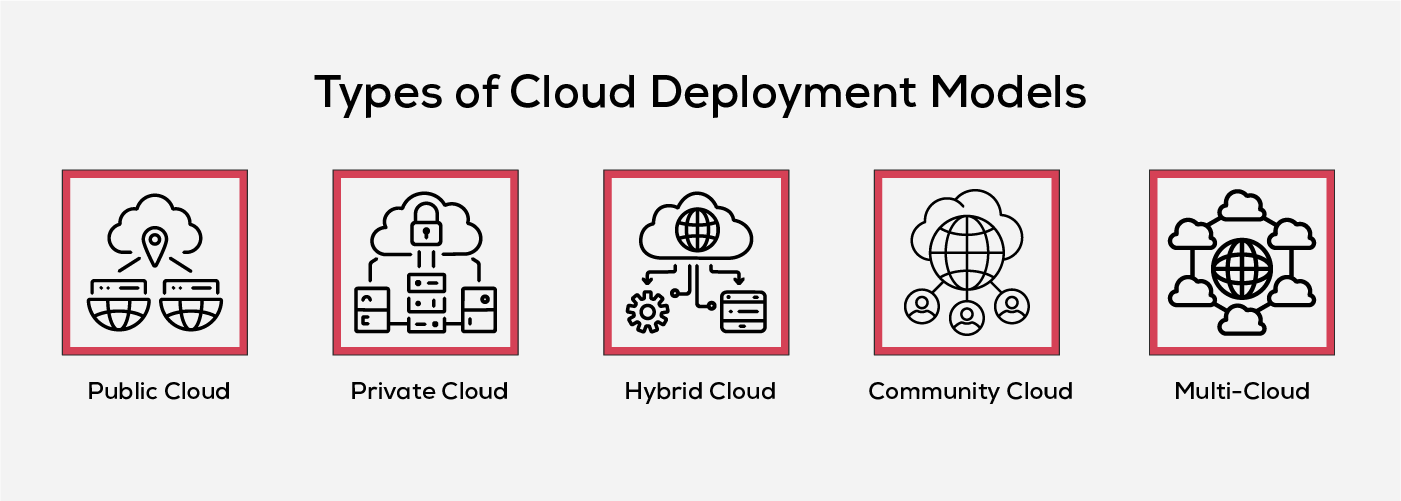
The main deployment models are public, private, hybrid, community and multi-cloud. Each has distinct advantages and limitations, making them suitable for different business requirements.
1. Public Cloud Deployment Model
The public cloud is the most widely adopted deployment model, where infrastructure and services are owned, managed and operated by a third-party cloud provider. In this model, computing resources such as servers, storage, and networking are hosted in the provider’s data centres and made accessible to multiple organizations over the internet. While resources are shared among tenants, strict isolation mechanisms ensure that each customer’s data and workloads remain secure.
Public cloud providers handle all aspects of infrastructure management, including physical security, maintenance, updates and compliance with industry regulations. This eliminates the need for organizations to invest in or operate their own data centres. Most services are consumed on a pay-as-you-go basis and can be accessed through a web interface, command-line tools, APIs or infrastructure-as-code frameworks like Terraform. While the underlying infrastructure is shared, providers may offer dedicated or isolated hardware for workloads with specific compliance or performance requirements.
Public clouds are well-suited for scalable applications, dynamic workloads, and businesses seeking rapid deployment without significant capital expenditure.
Benefits of Public Cloud
- Cost Efficiency: Eliminates capital expenditure on hardware and facilities, offering a pay-as-you-go model with no location or procurement constraints.
- Minimal Management Overhead: The provider handles all infrastructure operations, reducing the need for dedicated in-house IT teams.
- High Scalability: Virtualization enables rapid vertical and horizontal scaling to meet fluctuating workload demands.
- Reliability: Built-in redundancy and distributed infrastructure ensure high availability and minimal service interruptions.
- Broad Accessibility: Supports multiple service models (IaaS, PaaS, SaaS) and can be accessed from any internet-enabled device.
Limitations of Public Cloud
- Resource Contention: Multi-tenant architecture can occasionally affect performance and flexibility during peak demand.
- Data Sensitivity Risks: Not ideal for workloads with strict compliance or regulatory requirements due to shared infrastructure.
- Security Exposure: Large-scale public environments are common targets for cyberattacks, making data protection a critical concern.
- Limited Customization: Offers basic configuration options such as VM (virtual machine) size and operating system but restricts deep customization of infrastructure and networking.
Key providers
- Amazon Web Services (AWS), Microsoft Azure, Google Cloud Platform (GCP), Oracle Cloud and Alibaba Cloud.
2. Private Cloud Deployment Model
A private cloud is a dedicated cloud environment used exclusively by a single organization. Unlike public clouds, where infrastructure is shared among multiple tenants, a private cloud’s hardware, storage, and network resources are reserved for one entity. This model can be hosted on-premises within the organization’s own data centre or in a third-party facility, but in both cases, the infrastructure is operated in a controlled, secure environment managed either internally or by a contracted provider.
Private clouds are designed for organizations that require enhanced security, regulatory compliance, and granular control over their IT resources. The infrastructure can be tailored to specific workload requirements, allowing for greater customization and governance. However, this model typically involves higher upfront and operational costs compared to public cloud solutions, as the organization bears the full expense of hardware, software, and maintenance. To manage usage and allocate costs internally, private cloud environments often employ a chargeback or show back mechanism, enabling departments or business units to track and account for resource consumption.
Benefits of Private Cloud
- Exclusive Ownership and Control: Full authority over integrations, operations, compliance policies, and user practices.
- Support for Legacy Applications: Enables the continued operation of workloads that may not be compatible with public cloud environments.
- Enhanced Data Security: Access is restricted to authorized personnel, ensuring stronger protection for sensitive corporate data.
- Customizable Infrastructure: Tailored configurations and solutions can be implemented to meet specific business and workload requirements.
- High Performance Reliability: Consistent and predictable performance with minimal external dependencies.
- Granular System Configuration: Greater flexibility in hardware and software adjustments to align with organizational standards.
Limitations of Private Cloud
- Higher Cost of Ownership: Capital and operational expenses for hardware, software, and skilled personnel fall entirely on the organization.
- Under-utilization Risk: Idle capacity translates into direct financial inefficiency.
- Scalability Constraints: Expansion is limited by existing hardware capacity and procurement cycles.
- Maintenance Burden: In-house management demands ongoing updates, monitoring, and technical support.
- Potential Storage Limitations: Physical storage constraints can directly impact workload deployment and growth.
3. Hybrid Cloud Deployment Model
A hybrid cloud integrates two or more distinct deployment models, most commonly public and private clouds, connected through standardized protocols that enable seamless interoperability. This approach allows organizations to retain sensitive workloads in a controlled private environment while leveraging the scalability and cost-efficiency of the public cloud for less sensitive or variable workloads.
Hybrid clouds are particularly effective for cloud bursting, where applications run primarily in a private cloud but temporarily shift excess demand to the public cloud during usage spikes.
By combining the governance and security of private infrastructure with the elasticity and global reach of public resources, hybrid cloud deployments offer a flexible strategy that meets diverse workload requirements. This makes them well-suited for enterprises undergoing phased cloud adoption, organizations with seasonal demand fluctuations, and businesses operating in regulated industries that require a mix of deployment environments.
Benefits of Hybrid Cloud
- Cost Optimization: Balances workloads across public and private environments to reduce operational expenses.
- Enhanced Security Management: Segmented storage and clear protocol separation simplify the implementation of security controls.
- High Flexibility: Infrastructure and services can be tailored to specific business and workload requirements.
- Scalable Architecture: The combination of deployment models allows rapid scaling to handle fluctuating demands.
Limitations of Hybrid Cloud
- Management Complexity: Coordinating multiple cloud environments requires advanced integration and monitoring capabilities.
- Selective Applicability: Delivers the most value for organizations with diverse workload patterns and varying infrastructure needs.
- Infrastructure Dependency: Performance and scalability can be influenced by underlying hardware and network capabilities.
- Potential Security Risks: Public cloud connectivity may introduce vulnerabilities if not properly configured and monitored.
4. Community Cloud Deployment Model
A community cloud is a shared cloud infrastructure designed for use by multiple organizations within the same industry, sector or with shared objectives. Access is restricted to members of the specific community, enabling participants to benefit from a collaborative environment while maintaining higher privacy and security standards than those typically found in public clouds.
This model is often used in banking, government, education and research sectors, where participants have similar compliance requirements, operational goals and data protection needs. For government applications, community clouds often referred to as Government Clouds, help address jurisdictional regulations and data sovereignty laws by ensuring infrastructure is hosted within the required legal boundaries.
Benefits of Community Cloud
- Cost Sharing: Shared infrastructure spreads capital and operating expenses across members, lowering pertinent costs compared with dedicated private environments.
- Scalability and Flexibility: Capacity can be expanded or reduced to match community demand, supporting variable research or academic workloads.
- Compliance Aligned Configuration: Policies, controls and protocols are standardized to sector requirements, improving efficiency and audit readiness for regulated domains.
- High Availability for Sector Use Cases: Pooled resources and coordinated operations enhance reliability, making the model well suited to government, education and consortium projects.
Limitations of Community Cloud
- Capacity Constraints: Bandwidth and storage can be limited relative to hyperscale public clouds, affecting data intensive workloads.
- Security Maintenance Burden: Meeting strong security standards requires skilled staff and mature governance across participating organizations.
- Higher Collective Overhead: Initial setup and ongoing maintenance costs persist even when shared and can exceed public cloud alternatives.
- Feature Trade-offs: Does not deliver the full customization of a private cloud or the breadth of services available in a public cloud.
5. Multi-Cloud Deployment Model
A multi-cloud deployment involves the use of services from two or more public cloud providers simultaneously. Unlike the hybrid cloud model, which blends private and public infrastructure, multi-cloud strategies rely entirely on multiple public clouds to distribute workloads and data. This approach enables organizations to leverage the strengths of different providers, such as specialized services, pricing advantages, or geographic availability, while reducing reliance on a single vendor.
One of the primary drivers of multi-cloud adoption is resilience. By spreading workloads and databases across different providers, multi-cloud environments help ensure that an outage in one platform does not impact the entire infrastructure. Since it is rare for two independent public cloud services to fail at the same time, this model significantly improves uptime and service continuity.
Multi-cloud deployments are also used to meet regional compliance requirements, optimize performance by placing workloads closer to end users and avoid vendor lock-in. However, this flexibility comes with the need for integration, governance and monitoring to manage multiple environments effectively.
Benefits of Multi-Cloud
- Provider Specialization: Enables the use of best-in-class services from different providers to match specific application, workload, or business requirements.
- Optimized Performance: Reduces latency and enhances user experience by deploying workloads in geographic regions closer to end users.
- High Service Reliability: Minimizes downtime risk, as simultaneous outages across multiple independent cloud platforms are highly unlikely.
Limitations of Multi-Cloud
- Data Transfer Costs: Moving data between providers can incur significant expenses, especially for high-volume workloads.
- Operational Complexity: Requires the design, implementation and maintenance of multiple deployment and integration pipelines.
- Monitoring and Troubleshooting Challenges: Distributed architecture across multiple providers complicates visibility, incident response and performance tracking.
Choosing the Right Cloud Deployment Model
When selecting a cloud deployment model, consider the following key factors:
- Business Objectives: Align the choice with organizational priorities such as cost optimization, scalability, security, and compliance. Assess data sensitivity, workload patterns, and geographic requirements.
- Model Suitability:
- Private Cloud – For strict security, compliance mandates, and high customization needs.
- Public Cloud – For cost-effective scalability, rapid deployment, and broad accessibility.
- Hybrid Cloud – For flexibility, workload portability, and optimized resource allocation.
- Provider Capabilities: Compare features, integration support, geographic reach, SLAs, and service portfolios across leading providers.
- Cost Structure: Evaluate total cost of ownership, pricing models, and potential savings, factoring in both operational and capital expenses.
- Scalability & Performance: Ensure the model supports growth forecasts, seasonal spikes, and performance demands with features like auto-scaling and distributed computing.
- Security & Compliance: Verify encryption, identity and access controls, and relevant compliance certifications, especially in regulated industries.
Selecting the right deployment model requires balancing technical capabilities with strategic goals to ensure both immediate efficiency and long-term adaptability. Inspirisys cloud services are designed to help enterprises build secure, scalable, and cost-efficient environments tailored to their operational goals. From architecture design to migration, optimization, and ongoing management, we ensure a smooth and future-ready transformation.
Future Trends in Cloud Computing
Cloud computing is entering a phase of rapid diversification and specialization. Emerging technologies, evolving security requirements and sustainability goals are shaping the way infrastructure is deployed, managed and optimized. The following trends highlight where the cloud ecosystem is headed and what will define its next generation.
1. Rise of Multi-Cloud Strategies
Enterprises are increasingly using multiple cloud providers to combine best-in-class services, optimize workloads, and reduce dependency on a single vendor. This approach also enhances resilience by minimizing the risk of downtime from provider outages.
2. Growth of Edge Computing
Processing data closer to its source, such as IoT devices or local servers, reduces latency and enables faster insights. This is critical for real-time applications in industries like smart cities, healthcare, and autonomous systems.
3. Expansion of Serverless Architectures
By removing the need to manage servers, serverless computing accelerates application deployment, reduces operational overhead and allows teams to focus purely on code and business logic.
4. Advanced Cloud Security
AI-driven threat detection, machine learning analytics and zero-trust security frameworks such as NIST Zero Trust Architecture (SP 800-207), CISA Zero Trust Maturity Model and CSA’s Zero Trust Advancement Center are becoming standard. These frameworks, combined with automated monitoring and compliance tools, are helping organizations counter sophisticated cyber risks while meeting regulations such as GDPR, HIPAA and CCPA.
5. Sustainability in the Cloud
Green cloud initiatives, like energy-efficient data centers, renewable power usage, and optimized cooling systems are addressing environmental concerns while lowering operational costs.
Conclusion
Cloud deployment models evolve alongside business priorities, regulatory landscapes and technological capabilities. The most effective strategies recognize that the “right” model today may require recalibration tomorrow as workloads, compliance needs and market conditions shift.
Evaluating deployment models through the lens of governance, performance, cost efficiency and adaptability ensures that infrastructure remains aligned with both current and future objectives. With emerging trends such as distributed cloud, edge integration and AI-enabled security reshaping the landscape, the ability to reconfigure and optimize cloud environments will increasingly define competitive strength.
Frequently Asked Questions
1. What is the role of AI in cloud computing?
AI enhances cloud computing by enabling predictive analytics, automated resource scaling, advanced security threat detection, and intelligent workload management, improving efficiency and decision-making.
2. How does disaster recovery work in the cloud?
Cloud-based disaster recovery uses replication and backup services hosted in geographically separate data centers to quickly restore applications and data after an outage or failure, reducing downtime and data loss.
3. What is serverless computing and how does it differ from traditional cloud hosting?
Serverless computing allows developers to deploy code without managing servers or infrastructure. The cloud provider automatically provisions, scales and manages resources, charging only for execution time rather than fixed capacity.
4. What is cloud bursting?
Cloud bursting is a hybrid cloud setup where an application runs in a private cloud under normal workloads but “bursts” into a public cloud during demand spikes to handle increased capacity.
5. How does cloud computing support remote work?
Cloud computing enables remote work by providing secure, scalable access to applications, data and collaboration tools from any internet-connected device, supporting flexible work environments.